網頁

顯示具有 shell script 標籤的文章。 顯示所有文章

2021年1月24日 星期日

依檔案清單大量找檔案並拷貝

有一個檔案清單紀錄要找尋在 dir 目錄下的檔案,並將找到的檔案拷貝到桌面 tmp目錄下,
找尋的目錄dir,目錄下有多層目錄共38006個檔案(沒有順序)。

方法1:使用 shell script 管線導向來實現
程式碼:https://ideone.com/e.js/E0W01z
所需時間:1.085s
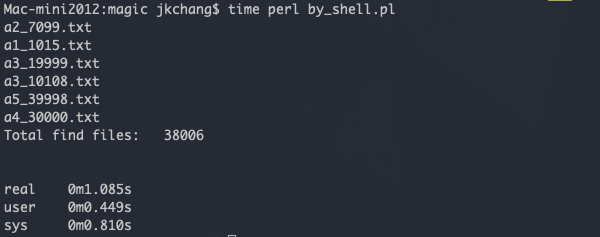
方法2:遞迴目錄下的每一檔案並製成HASH索引,讀取檔案清單,依清單比對HASH
程式碼:https://ideone.com/HDhrp6
所需時間:1.298s


方法3:讀取檔案清單1,然後遞迴目錄下的檔案比對,檔案清單2,遞迴目錄下的檔案比對...
程式碼:https://ideone.com/1a2BWb
所需時間:6.588s


方法4:讀取檔案清單製成HASH索引,然後遞迴目錄下的每一檔案比對HASH。
程式碼:https://ideone.com/hbZekq
所需時間:1.261s


由上可知效率上來說:方法1 > 方法4 > 方法2 > 方法3

利用 bash command 和管線(pipe line) 可以快速達到這個結果,如果只是想查看搜尋結果可以這樣:
find 目錄 | grep -F -f 欲搜尋的檔案list


2020年4月12日 星期日

使用 vim 讀取TSK log 檔案

上一篇介紹了用 C語言來讀取 TSK log 檔,這篇來講講使用 vim 編輯器直接使用搜尋/替換
的方式來轉換 log 檔。

1. 首先,用 vim 開啟 LOG_1.DAT 檔案:

2. 接著你會看到像下面的樣子,資料是用ASCII 0串在一起 (16進制 0x00):

 3. 先按ESC退出編輯模式,按下/\%x00,
   說明: 第一個 "/"是搜尋,"\"跳脫下一個 "%","x00" 就是16進制 0

   然後按Enter 後你會看到有找到的字元都會被高亮起來,
   如果你的 vim 沒有高亮可以用 :set hlsearch 來設定。

4. 接著就將找到的這些字元替換成換行字元(\r)
 輸入 :%s/\%x00/\r/g
 說明: 搜尋/替換的格式為 %s/ 搜尋的字 / 替換的字 /g
 其中 s: search , g: global (全部的意思)

5. 如果沒輸入錯誤應該會看到如下的畫面,如果正確
  用 :w 檔名 ,另存新檔即可。

6. 按下 :q! 離開


2017年12月22日 星期五

UNIX入門課程1061_ex10

 http://erdos.csie.ncnu.edu.tw/~klim/unix-intro/unix-intro-1061.html

作業10: awk programming, associative array
如下例所示, 計算每個人的總和.
$ cat IN-7
# sample input file of exercise 7
                    # this is an blank line.
1234 Alice          # Alice wins 1234
999  Bob            # Bob wins 999
Alice 200           # Alice spends 200
Bob 100 Alice       # Bob loses 100 to Alice
4000 Bob 250 Carol  # Bod wins 4000 and loses 250 to Carol
3000 Carol 300      # Carol wins 3000 and spends 300

$ ./ex10.awk IN-7 Carol has 2950 Bob has 4649 Alice has 1134
$

解答:

#!/usr/bin/awk -f
BEGIN {
}
{
  sub(/#.*/,"") # change #.*  to ""
  for (i=1; i<=NF; i++) {
    if ($i ~ /^[0-9]/) {   #-----$1 is number
      money=$i
      if (i==2 || i==3) {  #-----money is spends or loses
        name=$(i-1)
        array[name]=array[name]-money
      }
    } else {               #-----$1 is name
      name=$i
      money=$(i-1)
      array[name]=array[name]+money
    }
  } #for END
}
 
END {
  for (name in array)
    printf("%s has %s\n", name, array[name])
}

執行結果:


2017年12月15日 星期五

UNIX入門課程1061_ex9

http://erdos.csie.ncnu.edu.tw/~klim/unix-intro/unix-intro-1061.html
作業九: listing a directory recursively
•建立一個 shell 執行檔, 名為 showdir, 可印出 類似用 tree -F 所得的結果.
若檔案為一目錄, 則在檔名後加 '/'
若檔案為一 symbolic link, 用箭頭顯示. 如上圖所示.
若目錄無法讀取內容, 則略過其以下的內容, 即只顯示目錄名字.
請勿用 find, du 或其他指令先得到一個 tree.


$./showdir /var/tmp/exer9-test-dir
exer9-test-dir/
|---city/
|   |---lapula --> ../sky/temple/utopia
|   `---rome
|---dogs/
`---sky/
    |---birds
    |---mountains
    `---temple/
        |---asking
        `---utopia

$ tree -F /var/tmp/exer9-test-dir
/var/tmp/exer9-test-dir
|-- city/
|   |-- lapula -> ../sky/temple/utopia
|   `-- rome
|-- dogs/
`-- sky/
    |-- birds
    |-- mountains
    `-- temple/
        |-- asking
        `-- utopia
     
4 directories, 6 files
$


解答:
#!/bin/bash
olddir=$PWD
dirdepth=0
function is_last_file {
  local flag
  let flag=${ary[dirdepth]}-1
    if [ $flag -eq 0 ]; then #last file
      ch="\\"  #as \---
    else
      ch="|"   #as |---
    fi
}
function print_file {
  is_last_file #check this file is last?
  case "$1" in
      -D) printf "$ch---$2/\n"
          ;; #file is directory
      -L) printf "$ch---$file --> "
          ls -l $file | awk '{ print $11 }'
          ;; #file is link
      -F) printf "$ch---$file\n" #normal file
          ;; #file is normal file
  esac
  let ary[dirdepth]=ary[dirdepth]-1
}
function check_file_type {
  if [ $dirdepth -gt 0 ]; then  
          for ((i=0; i<=dirdepth-1; i++)); do
            if [ ${ary[i]} -ne 0 ]; then
              printf "|   " #print | & 3 space
            else
              printf "    " #print 4 space
            fi
          done # for END
  fi
  if [ -d "$file" ]; then 
      print_file -D $file #directory  
  else          
      if [ -L $file ]; then
          print_file -L $file #symbolic link
      else 
          print_file -F $file #normal file
      fi
  fi
}
function listfiles {
  cd "$1";
    f_count=`ls -l | wc -l`  #calc total files 
    let f_count=f_count-1
    ary[dirdepth]=$f_count

  if [ $f_count -ne 0 ]; then # if dir is empty then exit
    for file in *; do
      check_file_type $file #call sub
      if [ -d "$file" ]; then
          let dirdepth=$dirdepth+1
          listfiles "$file"
          cd ..;
      fi
    done #for END
  fi
  let dirdepth=$dirdepth-1
}
#-----Main Program 2017/12/06 update-----
#d=$1
#echo "${d##*/}/"
echo "$(basename "$1")/"
listfiles "$1"
 
執行結果:


2017年12月9日 星期六

UNIX入門課程1061_ex8

http://erdos.csie.ncnu.edu.tw/~klim/unix-intro/unix-intro-1061.html

作業八: hanoi tower
•建立一個 shell 執行檔, 名為 hanoi, 可印出 hanoi tower problem 中 disc 移動的順序

$ ./hanoi 2    # move 2 discs, from A to B by C
from A to C
from A to B
from C to B
$ ./hanoi 3    # move 3 discs, from A to B by C
from A to B
from A to C
from B to C
from A to B
from C to A
from C to B
from A to B
$

解答:

#!/bin/bash
function move_disc {
  if [ $1 -ne 0 ]; then
    move_disc $(($1-1)) $2 $4 $3
      echo from $2 "to" $3
    move_disc $(($1-1)) $4 $3 $2
  fi
}
#-----Main Program-----
disc=$1
if [ $disc -gt 0 ]; then
  move_disc $disc A B C
fi

執行結果:


2017年12月2日 星期六

UNIX入門課程1061_ex7

http://erdos.csie.ncnu.edu.tw/~klim/unix-intro/unix-intro-1061.html

作業七: range filter with sh
•建立一個 shell 執行檔, 名為 range, 其使用方法與上題類似, 但參數可能有二個, 可濾出上下限中間的數.
•從 stdin 讀入數字, 一行內的數可能超過一個
$ cat Numbers
6
7
8
9
10
11
12
13
14
129
37
8
119
$ cat Numbers | ./range 10 60
10
11
12
13
14
37
$ cat Numbers | ./range - 60
6
7
8
9
10
11
12
13
14
37
8
$ cat Numbers | ./range 200
$ cat Numbers | ./range 120
129
$ cat Numbers | ./range
6
7
8
9
10
11
12
13
14
129
37
8
119
$

解答:
#!/bin/bash
function Filter_Number() {
  local opt=$1
  local input_num=$2
  case "$opt" in 
    0)echo $input_num
      ;;
    1)if [ $input_num -ge $range_s ];then
        echo $input_num fi
      ;;
    2)if [ $range_s = "-" ]; then
        if [ $num -le $range_e ]; then
          echo $input_num
        fi 
      elif [ $input_num -ge $range_s -a $input_num -le $range_e ];then
        echo $input_num
      fi
      ;;
    esac
}

#-----main program-----
argc=$#
#echo "arg have:$argc"
case "$argc" in
  0);;
  1)range_s=$1
    ;;
  2)range_s=$1 range_e=$2
    ;;
esac
while read data
do
  #set $(echo $data)
  for num in $(echo $data)
    do
      #echo $num
      Filter_Number $argc $num
    done
done

執行結果:


2017年11月25日 星期六

UNIX入門課程1061_ex6

 http://erdos.csie.ncnu.edu.tw/~klim/unix-intro/unix-intro-1061.html

作業六: low pass and high pass filter with sh
•建立二個 shell 執行檔, 名為 less-than, greater-than
•每個執行檔會用到第一個參數當作 bound
•從 stdin 每一行讀一個數字, 滿足條件則印出到 stdout,
$ cat numbers
19
23
101
55
34
$ cat numbers | ./less-than 60
19
23
55
34
$ cat numbers | ./less-than 60 | ./greater-than 30
55
34
$

解答:
#-----less-then-----
#!/bin/sh
while read number
do
  if [ $1 -gt $number ]; then
    echo $number
  fi
done

#-----greater-then-----
#!/bin/sh
while read number
do
  if [ $number -gt $1 ]; then
    echo $number
  fi
done


執行結果:

2016年12月30日 星期五

UNIX入門課程1051_ex9

http://erdos.csie.ncnu.edu.tw/~klim/unix-intro/unix-intro-1051.html

作業九: figure out the average for each user(awk programming)
與作業七相同, 但改用 awk 來作. input 的 data 中的 name 可能會重複出現.
$ cat ex9-k1
klim 10 20 milk 199 joe 20
# klim is appeared again!
oak 100 red 200 10 klim 30
joe 199  marry 20 julie 2000  #joe joe
$ ./ex9.awk < ex9-k1
klim = 20.00
milk = 199.00
oak = 100.00
red = 105.00
joe = 109.50
marry = 20.00
julie = 2000.00
$

解答:
#!/usr/bin/awk -f
BEGIN {
}
{
  sub(/#.*/,"")
  if ( $0 != "" ) {
    for (i=1; i<=NF; i++) {
      if ( $i ~ /[a-z]/ ) {  # $1 is name
        name=$i
      }
      else {                 # $1 is number
        array[name]=array[name]+$i
        num_count[name]=num_count[name]+1
      }
    } #for i END
  } #if END
}
END {
for (i in array)
  printf("%s = %.2f\n",i, array[i]/num_count[i])
}
執行結果:


2016年12月23日 星期五

UNIX入門課程1051_ex8

http://erdos.csie.ncnu.edu.tw/~klim/unix-intro/unix-intro-1051.html

作業八: figure out the average and the max three (awk programming)
跟作業六一樣, 但改用 awk 來寫.
請全用 awk 來寫, 不要混用 sh 或 sed.
請寫成一個 script file, 並設定成可執行.
input 的 data 內可能有 comment.

$ cat k1
10 20 30 #this is a comment
8 7
# this is also a comment
2
$ ./ex8.awk k1
the max three are: 30 20 10
the average is   : 12.83
$

解答:

#!/usr/bin/awk -f
BEGIN {
}
{
  sub(/#.*/ , "")
  if ( $0 != "" ) {
    for (i=1; i<=NF; i++) {
      num[count]=$i
      sum+=$i
      count++
    } #for END
  } #if END
}
 
END {
  asort(num) #sort num[] array
  printf("the max three are: %d %d %d\n",num[count],num[count-1],num[count-2])
  printf("the average is   : %.2f\n",sum/count)
} 

注意:程式中asort函數在GNU awk 3.1才有提供


執行結果:


2016年12月16日 星期五

UNIX入門課程1051_ex7

http://erdos.csie.ncnu.edu.tw/~klim/unix-intro/unix-intro-1051.html

作業七: figure out the average for each user(sh programming)
$ cat ex7-k1
klim 10 20 30 milk 199 
oak 100 red 200 10
joe 199 20 marry 20 julie 2000
$ ./ex7.sh < ex7-k1
klim = 20.00
milk = 199.00
oak = 100.00
red = 105.00
joe = 109.50
marry = 20.00
julie = 2000.00
$

解答:

#!/bin/bash
function AVERAGE () {
  avg=$(echo "scale=2; $2/$3" | bc)
  echo "$1 = $avg"
}
function DATA () {
  #if [[ $1 != [0-9]*  &&  -n $1 ]]; then
  if [[ $1 =~ [a-z]+  &&  -n $1 ]]; then
    #echo "name:$1"
    name[index]=$1
    let index+=3
    sum=0
    count=0
  else
    let sum=sum+$1
    if [ ! -z $1 ]; then
      let count++
    fi
      name[index-2]=$sum
      name[index-1]=$count
  fi 
}
index=1
while read line
do
  if [ "$line" != "" ]; then
    set $(echo $line)
    field=$#    #*** $# is field count
    for ((i=1; i<=field; i++))
    do
      #echo "data:$1"
      DATA $1
      shift
    done
  fi
done #while END
for ((i=1; i<=index-3; i=i+3))
do
  #echo "Name:${name[$i]}  sum=${name[i+1]}  count=${name[i+2]}"
  AVERAGE ${name[$i]} ${name[i+1]} ${name[i+2]}
done

執行結果:


2016年12月6日 星期二

UNIX入門課程1051_ex6

http://erdos.csie.ncnu.edu.tw/~klim/unix-intro/unix-intro-1051.html

作業六: figure out the average and the max three (sh programming)
寫一個 sh 的 program, 算出所有數字的平均及最大的三個數
數字從檔案讀入(若有給檔名的話), 或是從 keyboard 讀入(即 stdin, 若沒給檔名的話).
平均數要算到小數第二位.
若數字的個數小於三個, 則補 0.

$ cat k1
10 20 30
8 7
2
$ ./ex6.sh k1
the max three are: 30 20 10
the average is   : 12.83
$ cat k2
888 2
30
11 222
$ ./ex6.sh k1 k2
the max three are: 888 222 30
the average is   : 111.81
$ ./ex6.sh
1 2 3
4
5 6
the max three are: 6 5 4
the average is   : 3.50
$


解答:
#!/bin/bash
#calc average function
function AVERAGE () {
    avg=$(echo "scale=2; $1/$2" | bc )
    #echo "the average is   : $avg"
}
#bubble sort function
function SORT() {
    for ((i=0; i<count; i++))
    do
        for ((j=i; j<count; j++))
        do
            if [ ${data[j]} -gt ${data[i]} ]; then
                let temp=data[j]
                let data[j]=data[i]
                let data[i]=temp
            fi
        done
    done
}

if [ -z $1 ]; then  #manual input
  while read line
  do
    if [ "$line" != "" ]; then
      #set $(echo $line | tr : ' ')
      set $(echo $line)
      field=$#
      for ((i=1; i<=field; i++))
      do
        data[count]=$1
        let sum+=$1
        let count+=1
        shift
      done
    else
      break
    fi
  done<&0  
else  #file(s) input
  total_file=$#
  for ((i=1; i<=$total_file; i++)) #file name put in f[] array
  do
    f[i]=$1
    shift
  done
  for ((j=1; j<=$total_file; j++))
  do
    exec<"${f[j]}"
    while read line
    do
      set $(echo $line)
      field=$#
      for ((i=1; i<=field; i++))
      do
        data[count]=$1
        let sum+=$1
        let count+=1
        shift
      done
    done
  done #for END
fi
SORT #Run Bubble sort function
echo "the max three are: ${data[0]} ${data[1]} ${data[2]}"
AVERAGE $sum $count #Run calc average function
echo "the average is   : $avg"
執行結果:


2016年11月25日 星期五

UNIX入門課程1051_ex5

http://erdos.csie.ncnu.edu.tw/~klim/unix-intro/unix-intro-1051.html

作業五: shell programming(for, if)
寫一個 shell 程式, 把參數中最大的數印出來.
For example:
$ ./ex5.sh
./ex5.sh numbers
$ ./ex5.sh 8 -1 9
9
./ex5.sh 8 -1 9 11 3 4
11
$


解答:

#!/bin/bash
max=0     #set default Max value
field=$#  #total arg 
  for ((i=1; i<=field; i++))
  do
    if [ $1 -gt $max ]; then
      max=$1
    fi
    shift
  done
echo $max


執行結果: